
Creating AR Invoice Using RecInvoiceService SOAP Webservice
We can use below SOAP WSDL to insert data into AR Invoice Interface table.
WSDL:
This WSDL is having below Methods:
- InvoiceServiceResponseBinding.
- InvoiceServiceSoapHttp.

Under InvoiceServiceSoapHttp, We have different methods which we can use for inserting data into RA_INTERFACE_LINES_ALL table or Creating AR invoice directly in Receivable.
Method Name | Usage |
createSimpleInvoice | This method is used to create a simple invoice document that lists amounts that are owed for the purchases of goods or services. |
processInterfaceContingency | Action to create multiple records in the contingencies interface table. |
processInterfaceContingency | Action to create multiple records in the distributions interface table. |
processInterfaceLine | Action to create multiple records in the lines interface table. |
processInterfaceSalesCredit | Action to create multiple records in the sales credits interface table. |
createInterfaceContingency | Action to create a record in the contingencies interface table. |
createInterfaceDistribution | Action to create a record in the distributions interface table. |
createInterfaceLine | Action to create a record in the lines interface table. |
createInterfaceSalesCredit | Action to create a record in the sales credits interface table. |
To insert data into RA_INTERFACE_LINES_ALL table, we have to create Line Transaction Flex fields which we need to use in SOAP payload.
Navigation:
Manage Receivables Descriptive Flex fields
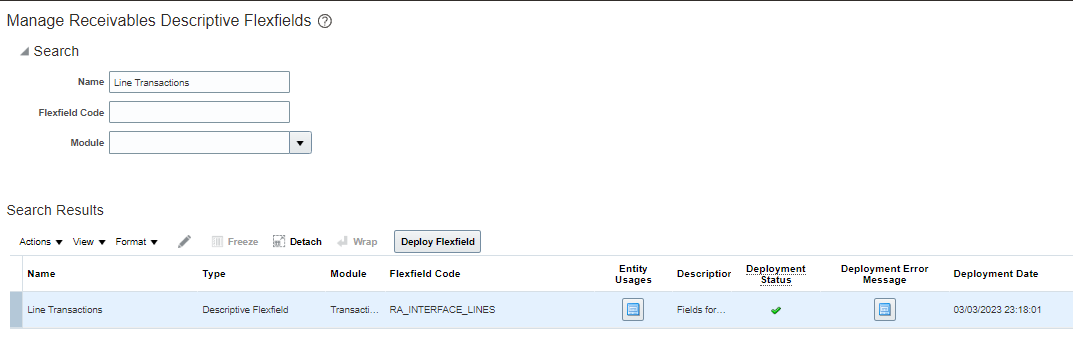
Define Context Sensitive Segments as shown below:
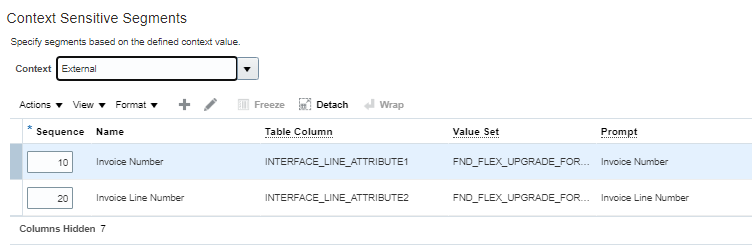
We can define any number of segments to identify record uniquely.
Now we need to define API name for each segment which we need to use in SOAP Payload.
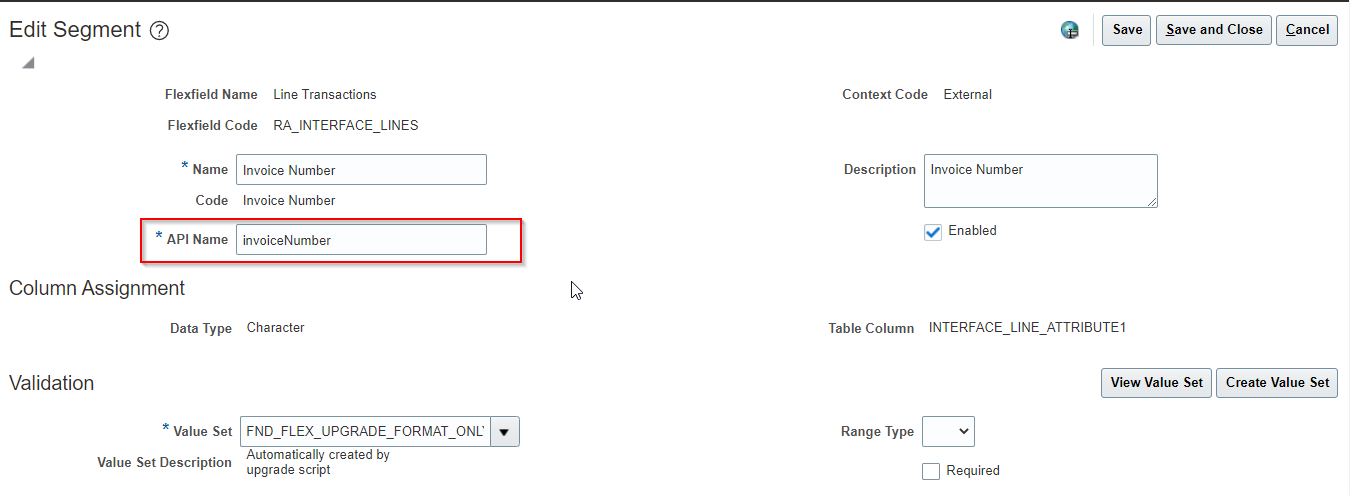
For Inserting data into RA_INTERFACE_LINES_ALL table using above Webservice, we can use below two methods:
-
createInterfaceLine:
We can insert single line at a time into RA_INTERFACE_LINES_ALL using this method.
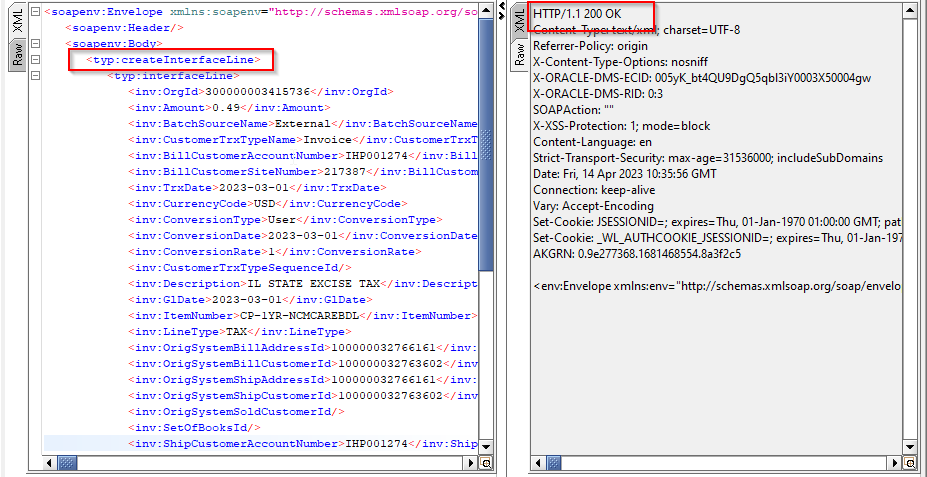
Payload:
 <soapenv:Envelope xmlns:soapenv="http://schemas.xmlsoap.org/soap/envelope/" xmlns:typ="http://xmlns.oracle.com/apps/financials/receivables/transactions/invoices/invoiceService/types/" xmlns:xsi="http://www.w3.org/2001/XMLSchema-instance" xmlns:inv="http://xmlns.oracle.com/apps/financials/receivables/transactions/invoices/invoiceService/" xmlns:ns3="http://xmlns.oracle.com/apps/flex/financials/receivables/transactions/autoInvoices/TransactionLineInterfaceLineDff/" xmlns:tran1="http://xmlns.oracle.com/apps/financials/receivables/transactions/autoInvoices/model/flex/TransactionInterfaceGdf/" xmlns:tran2="http://xmlns.oracle.com/apps/financials/receivables/transactions/autoInvoices/model/flex/TransactionLineInterfaceGdf/" xmlns:ns4="http://xmlns.oracle.com/apps/flex/financials/receivables/transactions/autoInvoices/TransactionInterfaceLinkToDff/" xmlns:tran4="http://xmlns.oracle.com/apps/flex/financials/receivables/transactions/autoInvoices/TransactionInterfaceReferenceDff/" xmlns:tran5="http://xmlns.oracle.com/apps/flex/financials/receivables/transactions/autoInvoices/TransactionLineDff/" xmlns:tran6="http://xmlns.oracle.com/apps/flex/financials/receivables/transactions/autoInvoices/TransactionInterfaceHeaderDff/">

   <soapenv:Header/>

     <soapenv:Body>

        <typ:createInterfaceLine>

           <typ:interfaceLine>

              <inv:OrgId>300000003415736</inv:OrgId>

              <inv:Amount>0.49</inv:Amount>

              <inv:BatchSourceName>External</inv:BatchSourceName>

              <inv:CustomerTrxTypeName>Invoice</inv:CustomerTrxTypeName>

              <inv:BillCustomerAccountNumber>IHP001274</inv:BillCustomerAccountNumber>

              <inv:BillCustomerSiteNumber>217387</inv:BillCustomerSiteNumber>

              <inv:TrxDate>2023-03-01</inv:TrxDate>

              <inv:CurrencyCode>USD</inv:CurrencyCode>

              <inv:ConversionType>User</inv:ConversionType>

              <inv:ConversionDate>2023-03-01</inv:ConversionDate>

              <inv:ConversionRate>1</inv:ConversionRate>

              <inv:CustomerTrxTypeSequenceId/>

              <inv:Description>IL STATE EXCISE TAX</inv:Description>

              <inv:GlDate>2023-03-01</inv:GlDate>

              <inv:ItemNumber>CP-1YR-NCMCAREBDL</inv:ItemNumber>

              <inv:LineType>TAX</inv:LineType>

              <inv:OrigSystemBillAddressId>100000032766161</inv:OrigSystemBillAddressId>

              <inv:OrigSystemBillCustomerId>100000032763602</inv:OrigSystemBillCustomerId>

              <inv:OrigSystemShipAddressId>100000032766161</inv:OrigSystemShipAddressId>

              <inv:OrigSystemShipCustomerId>100000032763602</inv:OrigSystemShipCustomerId>

              <inv:OrigSystemSoldCustomerId/>

              <inv:SetOfBooksId/>

              <inv:ShipCustomerAccountNumber>IHP001274</inv:ShipCustomerAccountNumber>

              <inv:ShipCustomerSiteNumber>217387</inv:ShipCustomerSiteNumber>

              <inv:TaxRate>0.070000000000</inv:TaxRate>

              <inv:TaxRateCode>127</inv:TaxRateCode>

              <inv:TaxRegimeCode>US SALES TAX</inv:TaxRegimeCode>

              <inv:TaxableAmount currencyCode="USD"/>

              <inv:PaymentTermsId/>

              <inv:PaymentTermsName>IMMEDIATE</inv:PaymentTermsName>

              <inv:TrxBusinessCategory>SALES_TRANSACTION</inv:TrxBusinessCategory>

              <inv:TrxNumber/>

              <inv:UOMCode>EA</inv:UOMCode>

              <inv:TransactionInterfaceLineDff xsi:type="ns3:External">

                 <ns3:__FLEX_Context>External</ns3:__FLEX_Context>

                 <ns3:invoiceNumber>1004</ns3:invoiceNumber>

                 <ns3:invoiceLineNumber>1</ns3:invoiceLineNumber>

              </inv:TransactionInterfaceLineDff>

           </typ:interfaceLine>

        </typ:createInterfaceLine>

     </soapenv:Body>

  </soapenv:Envelope>
We need to provide DFF while calling payload:
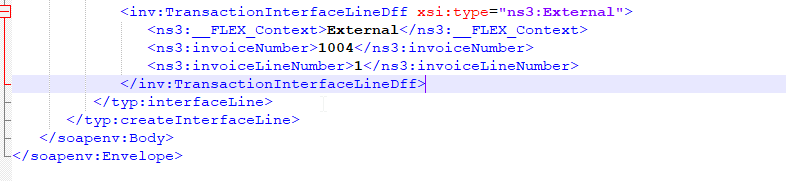
Here invoiceNumber and invoiceLineNumber represents API names corresponding to DFF segments.
Also, we need to define namespace for DFF. Here ns3 is defined as namespace as below:

We can check inserted data into RA_INTERAFCE_LINES_ALL.

Now we can run Import AutoInvoice Import Program to create this invoice in receivables.
2. processInterfaceLine:
We can insert multiple lines at a time into RA_INTERFACE_LINES_ALL using this method.
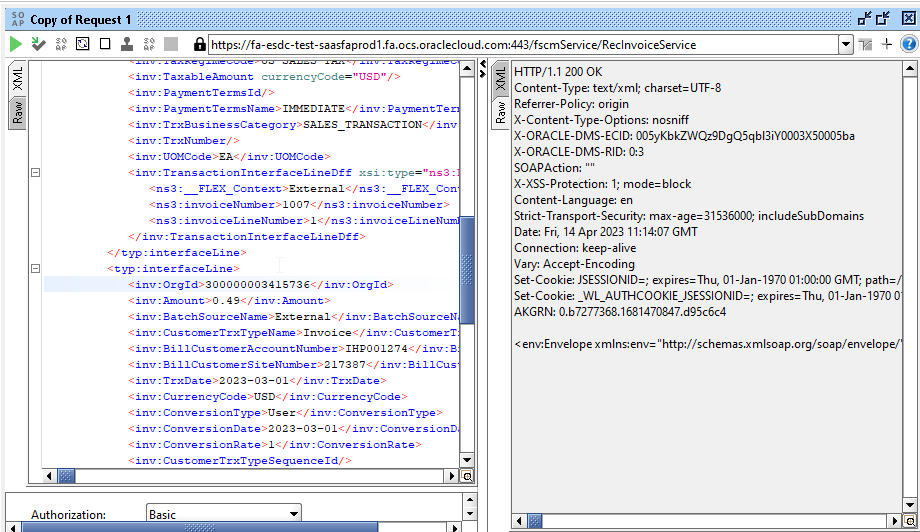
Payload:
<soapenv:Envelope xmlns:soapenv="http://schemas.xmlsoap.org/soap/envelope/" xmlns:typ="http://xmlns.oracle.com/apps/financials/receivables/transactions/invoices/invoiceService/types/" xmlns:xsi="http://www.w3.org/2001/XMLSchema-instance" xmlns:inv="http://xmlns.oracle.com/apps/financials/receivables/transactions/invoices/invoiceService/" xmlns:ns3="http://xmlns.oracle.com/apps/flex/financials/receivables/transactions/autoInvoices/TransactionLineInterfaceLineDff/" xmlns:tran1="http://xmlns.oracle.com/apps/financials/receivables/transactions/autoInvoices/model/flex/TransactionInterfaceGdf/" xmlns:tran2="http://xmlns.oracle.com/apps/financials/receivables/transactions/autoInvoices/model/flex/TransactionLineInterfaceGdf/" xmlns:ns4="http://xmlns.oracle.com/apps/flex/financials/receivables/transactions/autoInvoices/TransactionInterfaceLinkToDff/" xmlns:tran4="http://xmlns.oracle.com/apps/flex/financials/receivables/transactions/autoInvoices/TransactionInterfaceReferenceDff/" xmlns:tran5="http://xmlns.oracle.com/apps/flex/financials/receivables/transactions/autoInvoices/TransactionLineDff/" xmlns:tran6="http://xmlns.oracle.com/apps/flex/financials/receivables/transactions/autoInvoices/TransactionInterfaceHeaderDff/">

     <soapenv:Header/>

     <soapenv:Body>

        <typ:processInterfaceLine>

           <typ:changeOperation>Create</typ:changeOperation>

           <typ:interfaceLine>

              <inv:OrgId>300000003415736</inv:OrgId>

              <inv:Amount>0.49</inv:Amount>

              <inv:BatchSourceName>External</inv:BatchSourceName>

              <inv:CustomerTrxTypeName>Invoice</inv:CustomerTrxTypeName>

              <inv:BillCustomerAccountNumber>IHP001274</inv:BillCustomerAccountNumber>

              <inv:BillCustomerSiteNumber>217387</inv:BillCustomerSiteNumber>

              <inv:TrxDate>2023-03-01</inv:TrxDate>

              <inv:CurrencyCode>USD</inv:CurrencyCode>

              <inv:ConversionType>User</inv:ConversionType>

              <inv:ConversionDate>2023-03-01</inv:ConversionDate>

              <inv:ConversionRate>1</inv:ConversionRate>

              <inv:CustomerTrxTypeSequenceId/>

              <inv:Description>IL STATE EXCISE TAX</inv:Description>

              <inv:GlDate>2023-03-01</inv:GlDate>

              <inv:ItemNumber>CP-1YR-NCMCAREBDL</inv:ItemNumber>

              <inv:LineType>TAX</inv:LineType>

              <inv:OrigSystemBillAddressId>100000032766161</inv:OrigSystemBillAddressId>

              <inv:OrigSystemBillCustomerId>100000032763602</inv:OrigSystemBillCustomerId>

              <inv:OrigSystemShipAddressId>100000032766161</inv:OrigSystemShipAddressId>

              <inv:OrigSystemShipCustomerId>100000032763602</inv:OrigSystemShipCustomerId>

              <inv:OrigSystemSoldCustomerId/>

              <inv:SetOfBooksId/>

              <inv:ShipCustomerAccountNumber>IHP001274</inv:ShipCustomerAccountNumber>

              <inv:ShipCustomerSiteNumber>217387</inv:ShipCustomerSiteNumber>

              <inv:TaxRate>0.070000000000</inv:TaxRate>

              <inv:TaxRateCode>127</inv:TaxRateCode>

              <inv:TaxRegimeCode>US SALES TAX</inv:TaxRegimeCode>

              <inv:TaxableAmount currencyCode="USD"/>

              <inv:PaymentTermsId/>

              <inv:PaymentTermsName>IMMEDIATE</inv:PaymentTermsName>

              <inv:TrxBusinessCategory>SALES_TRANSACTION</inv:TrxBusinessCategory>

              <inv:TrxNumber/>

              <inv:UOMCode>EA</inv:UOMCode>

              <inv:TransactionInterfaceLineDff xsi:type="ns3:External">

                 <ns3:__FLEX_Context>External</ns3:__FLEX_Context>

                 <ns3:invoiceNumber>1007</ns3:invoiceNumber>

                 <ns3:invoiceLineNumber>1</ns3:invoiceLineNumber>

              </inv:TransactionInterfaceLineDff>

           </typ:interfaceLine>

           <typ:interfaceLine>

              <inv:OrgId>300000003415736</inv:OrgId>

              <inv:Amount>0.49</inv:Amount>

              <inv:BatchSourceName>External</inv:BatchSourceName>

              <inv:CustomerTrxTypeName>Invoice</inv:CustomerTrxTypeName>

              <inv:BillCustomerAccountNumber>IHP001274</inv:BillCustomerAccountNumber>

              <inv:BillCustomerSiteNumber>217387</inv:BillCustomerSiteNumber>

              <inv:TrxDate>2023-03-01</inv:TrxDate>

              <inv:CurrencyCode>USD</inv:CurrencyCode>

              <inv:ConversionType>User</inv:ConversionType>

              <inv:ConversionDate>2023-03-01</inv:ConversionDate>

              <inv:ConversionRate>1</inv:ConversionRate>

              <inv:CustomerTrxTypeSequenceId/>

              <inv:Description>IL STATE EXCISE TAX</inv:Description>

              <inv:GlDate>2023-03-01</inv:GlDate>

              <inv:ItemNumber>CP-1YR-NCMCAREBDL</inv:ItemNumber>

              <inv:LineType>TAX</inv:LineType>

              <inv:OrigSystemBillAddressId>100000032766161</inv:OrigSystemBillAddressId>

              <inv:OrigSystemBillCustomerId>100000032763602</inv:OrigSystemBillCustomerId>

              <inv:OrigSystemShipAddressId>100000032766161</inv:OrigSystemShipAddressId>

              <inv:OrigSystemShipCustomerId>100000032763602</inv:OrigSystemShipCustomerId>

              <inv:OrigSystemSoldCustomerId/>

              <inv:SetOfBooksId/>

              <inv:ShipCustomerAccountNumber>IHP001274</inv:ShipCustomerAccountNumber>

              <inv:ShipCustomerSiteNumber>217387</inv:ShipCustomerSiteNumber>

              <inv:TaxRate>0.070000000000</inv:TaxRate>

              <inv:TaxRateCode>127</inv:TaxRateCode>

              <inv:TaxRegimeCode>US SALES TAX</inv:TaxRegimeCode>

              <inv:TaxableAmount currencyCode="USD"/>

              <inv:PaymentTermsId/>

              <inv:PaymentTermsName>IMMEDIATE</inv:PaymentTermsName>

              <inv:TrxBusinessCategory>SALES_TRANSACTION</inv:TrxBusinessCategory>

              <inv:TrxNumber/>

              <inv:UOMCode>EA</inv:UOMCode>

              <inv:TransactionInterfaceLineDff xsi:type="ns3:External">

                 <ns3:__FLEX_Context>External</ns3:__FLEX_Context>

                 <ns3:invoiceNumber>1008</ns3:invoiceNumber>

                 <ns3:invoiceLineNumber>1</ns3:invoiceLineNumber>

              </inv:TransactionInterfaceLineDff>

           </typ:interfaceLine>

        </typ:processInterfaceLine>

     </soapenv:Body>

  </soapenv:Envelope>
Here we need to provide changeOperation as Create.
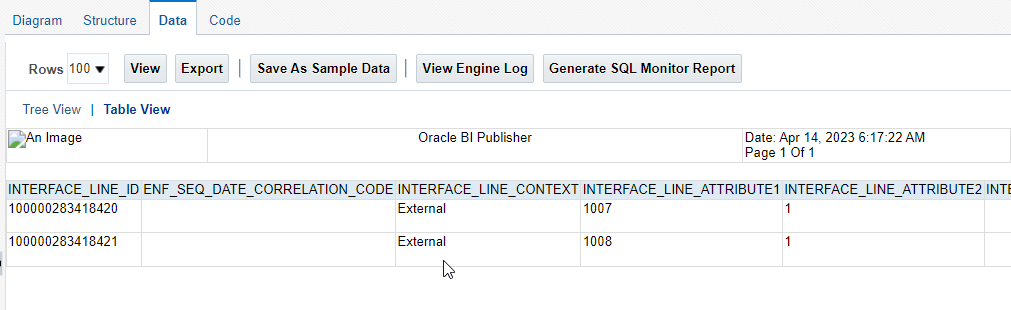
Here we can see two lines are inserted into RA_INTERFACE_LINES_ALL table.
